For macOS · no cloud, no subscription
A photo library
you own.
Hailstone organizes decades of photos into one clean, verified archive on your own drive or NAS — deduplicated, searchable, and independent of any cloud.
Your cloud, synced down to earth.
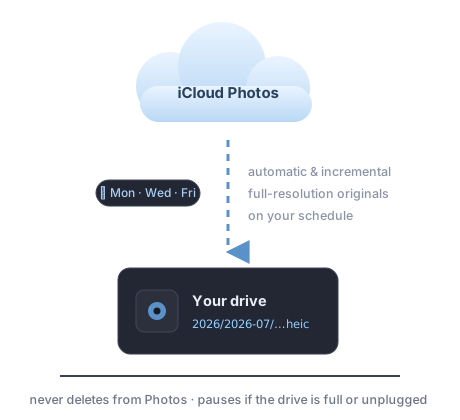
Connect Hailstone to Apple Photos once and your iCloud library syncs itself down to your own drive — full-resolution originals, pulled from iCloud, not the on-device derivatives. It runs on your schedule (every few hours, daily, or just the weekdays you pick), only fetches what's new since last time, and paces itself with a per-run cap so a big first sync spreads gently over days.
- Automatic and incremental — new shots sweep in on their own
- Hash-verified copies, filed by date, cataloged instantly
- Pauses safely when the drive is full, unplugged, or offline
- Never deletes from Photos or iCloud
A web server in the box.
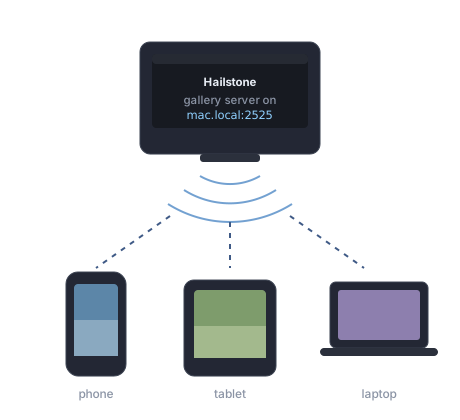
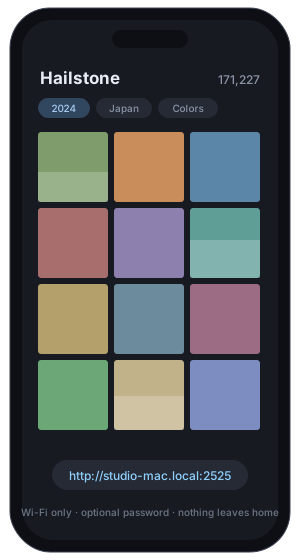
Your archive isn't locked inside one app on one Mac. Flip on the built-in gallery server and every device on your Wi-Fi can browse it in a plain web browser — same search, filters, colors, map, and stats as the desktop library. No uploads, no accounts, nothing leaves your network.
- Scan a QR code, get the whole library on your phone
- Read-only — browsing can never touch the archive
- Optional password for shared networks
A lifetime of photos shouldn't live on a subscription.
Twenty years of photography ends up scattered — across cloud services, old drives, exports, and downloads, heavily duplicated. Cloud libraries are great day to day, but as long-term storage they're a monthly bill for access to your own files, and you can never quite tell what's actually backed up where.
Hailstone takes a different deal: you bring the storage — a big external drive or a NAS — and it turns that storage into a real library. Organized, deduplicated, verified, and browsable. Every photo in the catalog is proof the original is safely archived, so what you keep in the cloud becomes a choice, not a dependency.
One archive, three ways in.
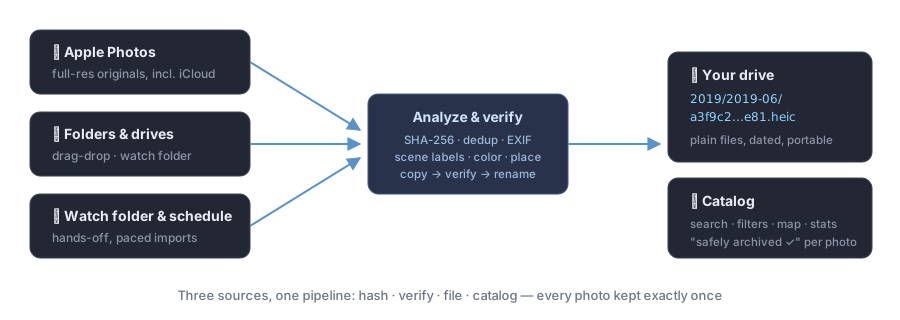
Point Hailstone at one destination — an external drive, a folder, a NAS, anything cheap and roomy. Everything that comes in is analyzed, verified, and filed the same way.
1 · Back up Apple Photos
Hailstone pulls full-resolution originals from your Apple Photos library — downloaded from iCloud, not the low-res derivatives — pacing itself with a per-run GB cap so it never floods your disk or network. Once it catches up, a scheduled tail (daily, or the days you choose) sweeps in each day's new shots. It never deletes from Photos.
2 · Import everything else
Drag decades of scattered folders, old exports, and loose drives onto the window — anywhere on it.
Or set a watch folder and toss files in as you find them. Every file is hashed, analyzed, and filed
into a clean dated archive: 2019/2019-06/<hash>.heic. Plain files. No lock-in.
3 · You stay in control
Every archived photo is hash-verified against the file on disk, so the catalog is a fact, not a guess. If you want to slim down iCloud afterwards, you can do it knowing exactly what's already safe — Hailstone itself never deletes anything from Photos.
Built on four promises.
Nothing deleted without proof
Every copy is hash-verified before any source is removed — and deleting from iCloud is always your hand on the trigger.
It never fills your drive
A free-space margin is always respected. Work pauses before your destination is endangered.
It survives an unplugged drive
Destination offline? Hailstone pauses, says why, and resumes by itself when the drive returns.
Originals, not thumbnails
The stream fetches true full-resolution originals from iCloud. A real backup, not a derivative.
Browsable, not buried.
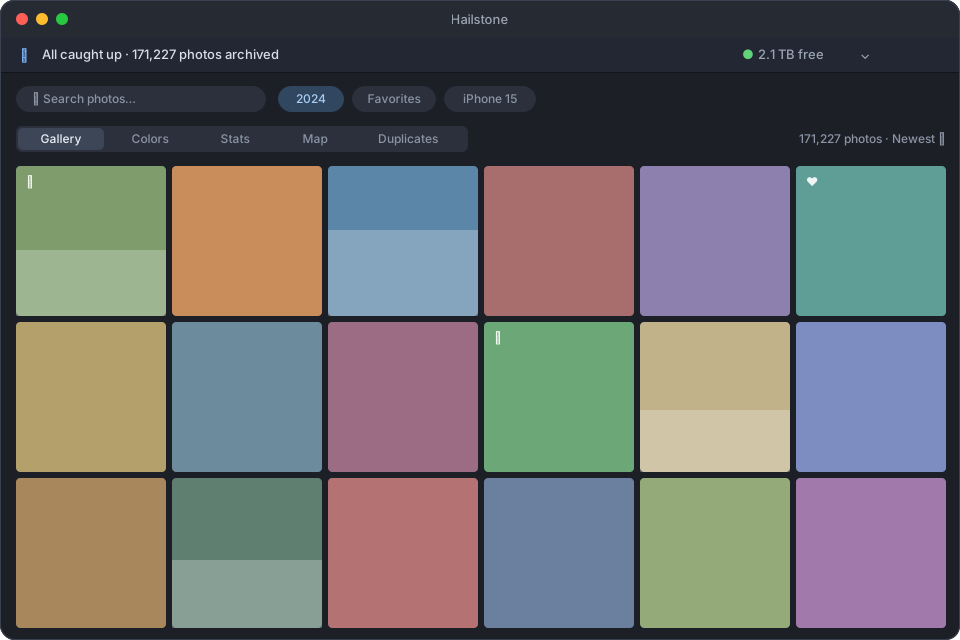
An archive you can't look at isn't a library. Everything stays one search away.
🔍 Search & filters
Year, place, camera, file type, favorites, albums, scene labels, size — combined however you like, instantly.
🎨 Colors
Your whole library laid out as a color field. Find that one photo you only remember as “mostly teal.”
🗺 Map & stats
Every geotagged photo on a map; charts of years, cameras, places, formats — your photographic life at a glance.
⚡️ Fast on huge libraries
Built native (SwiftUI + Core Data) and tested on 170k+ photo archives on NAS drives. Thumbnails cache locally so browsing never waits on the network twice.
🕰 Scheduled & hands-off
Run the stream every N hours, daily, or on the weekdays you pick. Pair with launch-at-login and forget it exists.
🔒 Private by design
No accounts, no cloud, no telemetry. Sandboxed, hardened-runtime, notarized. Your photos never leave your hardware.
One photo, one copy.
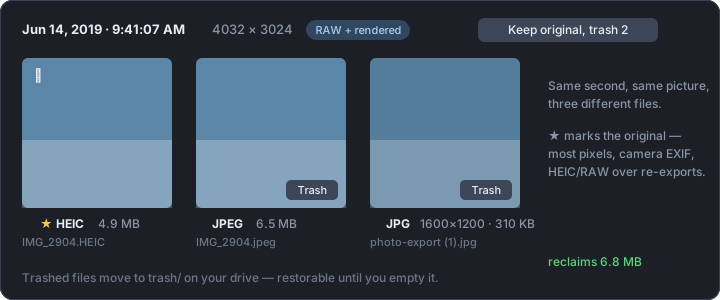
Twenty years of exports means the same picture lives everywhere — RAW + JPEG pairs, HEIC originals next to re-compressed copies, three sizes of the same shot. Hailstone sees through all of it.
Bit-level, at the door
Every file is SHA-256 fingerprinted on the way in. A byte-identical copy can never enter the archive twice — no matter what it's named or where it came from.
Visual, on demand
“Analyze visual dupes” compares actual pixels, catching the same picture across formats, sizes, and re-compressions. Merge keeps the original — most pixels, camera metadata, HEIC/RAW over re-exports — and trashes the rest.
Reversible, always
Trashed files move to a trash/ folder on your drive, restorable in one click until you empty it yourself. RAW + JPEG pairs can stack instead — keep both files, see one photo.
Your archive, on your phone.
No cloud required.
Flip on the built-in gallery server and your archive is browsable from any device on your Wi-Fi — scan a QR code and the whole archive opens in the phone's browser. Search, filters, colors, map and stats, full-quality viewing. Protect it with a password, or don't. Nothing ever leaves your home.
- Serves directly from the Mac — no uploads, no accounts
- Same filters and views as the desktop library
- Optional password (HTTP Basic) for shared networks
- Read-only: browsing can't touch the archive

Bring your own storage.
Hailstone is a native macOS app. One drive, one afternoon, and a lifetime of photos becomes a library you own.
Download Hailstone v0.1.0 betaRequires macOS 15 or later · No subscription
Early build, not yet notarized: on first launch, approve it under System Settings → Privacy & Security → “Open Anyway”.